ASO School
You can learn about ASO, App marketing, app store optimization and app promotional strategies here and gain the latest app market news and analysis. Helping you to carry out app store optimization and promote app data growth.
Google Play Keyword Research: Which Competitor Keywords Are You Missing?

Google Play keyword research should start with a specific question: which relevant terms do competitors cover that your app does not? Many app teams do not have too few keywords. They simply do not know which important terms they are missing.
Your app may already include product features in its Google Play app name, short description, and full description. You may also have a title, subtitle, and keyword field for the App Store. Yet competitors keep appearing for search intents that your app does not visibly cover. The real question is no longer “Should we expand the keyword list?” It is:
Which keywords do direct competitors cover that our app does not, and which of those gaps deserve a metadata or paid-acquisition action?
That is the practical use case for Google Play keyword research and AppFast's cross-store keyword tools. They can query covered keywords for both iOS and Google Play, show coverage statistics, and compare competitor coverage to surface important candidate gaps. Qualified iOS terms can then support Apple Search Ads (ASA) keyword selection and testing.
There is an important distinction: compared with many similar keyword tools, AppFast provides a broader keyword-coverage database, which makes own-versus-competitor gap analysis more useful. Coverage results are still not a text inventory of metadata fields and do not prove which field caused coverage. Treat the output as a discovery signal, inspect the actual metadata, and validate it against product relevance, target market, ranking, and conversion data.
What Google Play keyword research can reveal
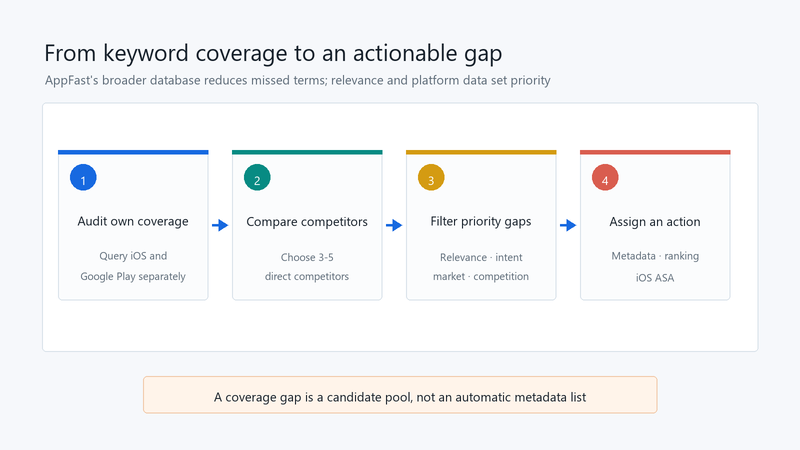
The first value of a keyword tool is turning “I think we already covered that” into an auditable result. AppFast's broader keyword database lets you query your app on Google Play and iOS separately to review covered terms and coverage statistics. Then query competitor coverage to identify candidate terms that are not observed for your app but recur across several direct competitors.
The output is not an automatic metadata list. It shows what your app covers, which additional terms appear in competitor results, and which differences deserve product and market review.
Audit your own coverage before comparing competitors
The most common keyword-research mistake is starting with competitors before creating a baseline for your own app. Without a baseline, you cannot tell whether a term is a new opportunity, an existing synonym, or simply another expression of a concept you already cover.
Start with AppFast's keyword coverage checker. For the same target market, record iOS and Google Play separately and answer four questions:
- Which core feature terms are already covered?
- Which use-case and problem-oriented long-tail terms are covered?
- Is coverage concentrated around a few broad category terms?
- Which relevant terms are present but still weak in rank or performance?
Coverage count is a diagnostic metric, not an ASO score. A broader database is valuable because it reduces missed-term risk in the comparison, but a large number of broad terms is still less useful than a smaller set of relevant terms that match a clear user task.
Keep iOS and Google Play in separate views
iOS and Google Play both use store metadata to understand an app, but their fields and optimization actions differ.
For iOS, teams commonly review the app name, subtitle, and keyword field. For Google Play, they review the app name, short description, and full description; there is no separate keyword field. The same English expression can appear in both stores, while keyword ranking, competition, and conversion differ by platform.
Do not copy an iOS keyword list directly into Google Play, and do not assume that Google Play coverage implies the same iOS coverage. Save results by these dimensions:
| Dimension | What to record |
|---|---|
| Store | iOS or Google Play |
| Market | Target country or region |
| Keyword | Term and semantic category |
| Coverage state | Covered by your app, competitor-covered, shared, or not observed |
| Statistics | Coverage count and related tool metrics |
| Next action | Metadata, rank monitoring, ASA test, or hold |
This prevents a platform difference from being mistaken for a product gap.
Use several direct competitors to find valuable gaps
Do not select only one top competitor. A single competitor may have a different positioning, feature set, or keyword strategy. Its coverage can pull brand terms, special-feature terms, or irrelevant traffic into your candidate list.
Choose three to five direct competitors that:
- serve a similar user need;
- target the same market;
- have comparable core features or business models;
- compete for the same search demand in the target store.
Group the results into three sets:
- Terms covered by your app and several competitors: likely category or core-demand terms; monitor rank and conversion rather than treating them as new gaps.
- Terms covered by several competitors but not observed for your app: the highest-priority gap candidates for manual review.
- Terms shown for only one competitor: possible special-feature, brand-related, or data-quality cases that require more caution.
The second group is useful because repeated competitor coverage signals a shared semantic direction. It does not reveal why those competitors cover the terms or prove a deliberate strategy. It is still not a command to add every term to metadata.
For example, a meeting-notes app may show `notes` and `voice recorder`, while several direct competitors also show `meeting transcription`. Review whether the product genuinely supports meeting transcription, then inspect whether the current metadata communicates that use case. This is an illustrative example, not a live query or a customer outcome.
Filter gaps before changing metadata
Finding a term is only the discovery step. Filter every candidate with four questions.
Does the product genuinely support the term?
If the app does not deliver the capability implied by the query, exposure can create low conversion, poor reviews, and false expectations. Relevance comes before volume.
Does the term express download intent?
Some queries describe tutorials, definitions, or news rather than a person looking for an app. A common web-search phrase is not automatically a good store-metadata term.
Does it fit this platform and market?
The same term can face different competition on iOS and Google Play, and the natural wording can vary across the United States, United Kingdom, and Canada. Validate the candidate in the target store and country.
What action would it trigger?
A keyword is worth prioritizing when it maps to a clear action:
- add it to a Google Play app name, short description, or full description;
- evaluate it for the iOS name, subtitle, or keyword field;
- test it in an iOS ASA exploration or exact campaign;
- monitor ranking first without changing metadata immediately.
If core terms are covered but use-case and long-tail directions are thin, use AppFast's keyword expansion tool to generate candidates. Treat expansion output as a candidate pool, then filter it by competitor coverage, product relevance, and platform evidence.
Turn competitor gaps into metadata actions
Do not place every selected term in one field. For Google Play optimization, inspect current metadata before mapping candidates to the platform and user intent:
| Keyword type | Google Play action | iOS action |
|---|---|---|
| Core feature term | Evaluate the app name and short description first | Evaluate the name, subtitle, and keyword field |
| Use-case term | Add naturally to the short or full description | Evaluate the subtitle, keyword field, and product-page copy |
| Problem-oriented long tail | Cover naturally in the full description and monitor rank | Use available fields and custom product-page messaging |
| Brand or competitor-related term | Confirm relevance and policy risk | Confirm relevance and ASA value before testing |
Google Play full descriptions should not become keyword dumps. iOS keyword fields should not be filled with long sentences. Metadata still needs to read naturally for users before it can help the store understand relevance.
How iOS gaps can feed ASA testing
Competitor coverage has an additional use on iOS: it can help build a candidate pool for Apple Search Ads (ASA) search-results campaigns.
Consider testing a gap term when it is highly relevant to the product, appears across several direct competitors, expresses clear app-seeking intent, and has weak organic coverage or limited ranking evidence for your app.
ASA can validate iOS search intent, taps, and installs. It does not prove that the term is suitable for Google Play. Google Play candidates still require platform-specific store-visit, install, and ranking evidence. The two data sets can inform each other, but they cannot replace each other.
AppFast has broader coverage, but avoid these three mistakes
A broader database reduces missed opportunities. It does not make keyword selection automatic.
First, a broader coverage database does not replace judgment. AppFast offers a wider coverage view than many similar tools, but compare the same store and market at similar query times, and use the tool's current definitions for statistics.
Second, one competitor is not an industry consensus. A single result may reflect a unique feature or brand strategy.
Third, coverage is not a high rank, and rank is not conversion. An observed term does not prove that it appears in a specific metadata field. Adding a relevant term does not guarantee taps or installs. ASO still requires ranking and store-page evidence.
Use a three-step review: cross-check several direct competitors, review product fit manually, and validate important terms with platform performance. For priority terms, monitor rank, store visits, install conversion, and ASA data instead of judging success only by coverage count.
Google Play keyword research FAQ
How do I find competitor keywords missing from my app?
Query your own coverage first, then several direct competitors in the same store and market. List terms observed for competitors but not your app, and filter them by product fit and intent. If the tool does not offer an automatic set comparison, organize the results in a spreadsheet and compare them manually.
Does a covered term mean it is already in my metadata?
Not necessarily. Coverage results and metadata text are different things. Inspect your actual name, descriptions, or iOS keyword field before adding terms. If a relevant term is already present but coverage is weak, review relevance and ranking instead of repeating it.
Can Google Play and iOS use the same keyword list?
They can share demand themes, but coverage, local wording, and performance need separate validation. Google Play has no independent keyword field. ASA testing is for iOS and does not establish Google Play conversion.
Does a larger coverage count mean better ASO?
No. Interpret the count alongside relevance, keyword rank, and install conversion. Differences in data scope also affect comparisons; total keyword count is not a performance guarantee.
Pre-change checklist
- Did you query iOS and Google Play separately?
- Did you establish your own coverage baseline first?
- Did you select three to five genuinely direct competitors?
- Did you isolate terms repeated across competitors but not observed for your app?
- Did you confirm product relevance and target-market fit?
- Did you map Google Play and iOS terms to the correct fields?
- Did you keep iOS gap terms separate from the ASA test plan?
- Did you treat competitor coverage as a signal rather than a complete truth?
- Does each priority term have a rank, visit, install, or conversion metric?
- Did you preserve the current metadata and coverage statistics before making changes?
Conclusion
The keyword count is not the end of the audit. The useful question is:
Which search needs are repeatedly covered by direct competitors while your app has not addressed them seriously?
AppFast helps answer that question from two directions: audit your current iOS and Google Play coverage, then compare competitor coverage and statistics to identify gaps worth reviewing. Google Play gaps can feed metadata and ranking work; iOS gaps can also become ASA tests for search intent and conversion quality.
If you already have a competitor list or keyword pool but are unsure which terms belong in Google Play metadata and which should be tested in iOS ASA, sign in to AppFast, review your coverage and competitor differences, and request a free ASO/ASA account diagnosis. Identify the platform, field, and growth stage where the gap exists before deciding what to optimize.
Usage note
This article describes AppFast keyword-tool workflows and decision rules. It does not use sensitive data from a specific client, account, or competitor. Examples are illustrative, not live results. AppFast's keyword-coverage database is broader than that of many similar tools, but confirm the store, target market, query time, supported data scope, and current statistical definitions before comparing results. Tool links require sign-in; this article does not claim free access or guarantee rankings or conversion.